Members

Household Ledger
budget and accounts, local on your machine
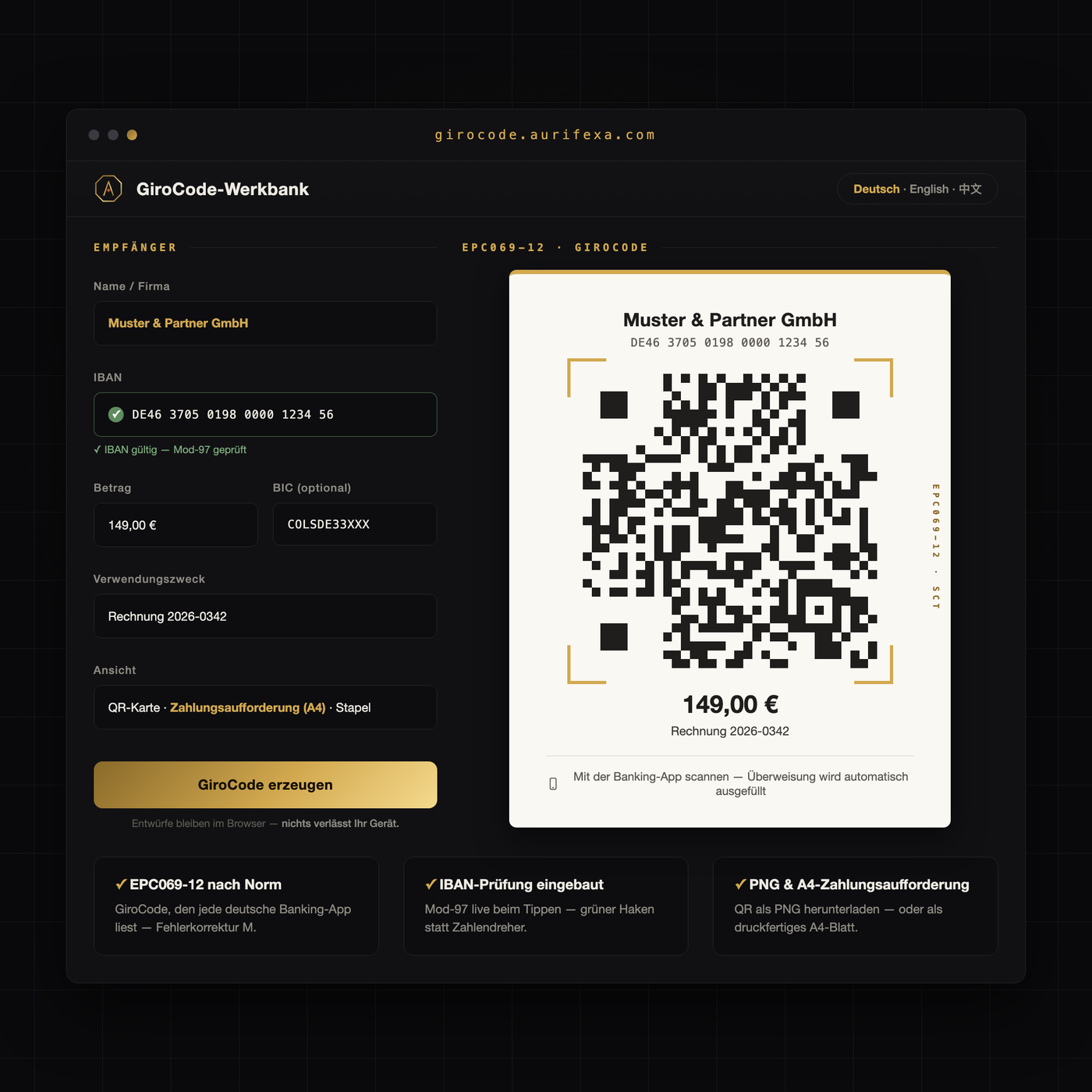
Your customers type out 22 digits of IBAN — or transfer later. Sometimes never. Every typo costs a follow-up, every hurdle costs days.
The GiroCode Workbench generates the banking-standard payment QR: scan once, transfer prefilled — amount, IBAN, reference.
An AURIFEXA original — designed and built in our own studio.
This tool is free. Create an account — no payment details — and download right away.
| Platform | Browser |
|---|---|
| Price | Free — registration is all it takes |
Anyone invoicing customers in Germany learns quickly that the default way to pay a bill here is a SEPA bank transfer (Überweisung), not a card payment. The customer types the recipient’s name, a 22-character IBAN, the amount, and a payment reference (Verwendungszweck) into their banking app. Every one of those fields is a chance for a typo — and every typo becomes a query, a mismatched payment, or simply a delay.
The GiroCode is the German name for the EPC QR code, a payment code standardized by the European Payments Council (guideline EPC069-12) for SEPA credit transfers. It is not an ordinary QR code hiding a link: it is a structured data set that banking apps read directly as a transfer — recipient, IBAN, amount, and reference included.
Most German banking apps support the code — the apps of the Sparkassen and cooperative banks as well as most private and direct banks. The scanner usually sits inside the transfer screen, behind a camera or QR icon. The flow:
Two points matter for trust. First, scanning never triggers a payment — the code only pre-fills the form, and authorization stays with the payer, protected by their usual security procedures. Second, the code grants no access to any account; it carries exactly the data already printed on the invoice, just in machine-readable form.
The code earns its keep wherever money is transferred regularly: invoices, club membership fees, donation appeals, printed notices. Place it directly next to the payment details, so both routes stay open — type or scan. Put the invoice number into the reference, and every incoming payment reconciles itself; no more guessing which transfer belongs to which invoice.
The effect is twofold. Payments arrive sooner, because the biggest hurdle — retyping — disappears and the bill gets paid now rather than “later”. And they arrive correctly, because nothing is transcribed by hand: no transposed digits in the IBAN, no mangled reference, no wrong amount.
A transfer to a formally valid but wrong IBAN will be executed by the bank, and recovering the money is tedious and not guaranteed. With a payment QR, that risk concentrates in a single moment: creation. Check your IBAN carefully then — ideally character by character against your bank statement — and the logic flips in your favor: every later scan transmits the same correct data, and transcription errors on the payer’s side are ruled out entirely. A hundred scans, a hundred times the same correct IBAN.
The GiroCode-Werkbank by AURIFEXA generates the payment QR to the EPC069-12 banking standard: enter IBAN, amount, and reference, generate the code, and place it on your invoice or notice. Because the code follows the standard, common banking apps read it reliably. The tool is free to use after registration — a sober building block that turns a payment request into a one-scan process.
GiroCode is the German name for the EPC QR code, a standardized payment code for SEPA credit transfers. It encodes the recipient’s name, IBAN, amount, and payment reference. When someone scans it with a banking app, the transfer form is pre-filled; they only review and authorize. It removes the need to type a 22-character IBAN by hand.
Most German banking apps can read GiroCodes, including those of the Sparkassen, the cooperative banks, and many private and direct banks. The scanner usually sits inside the transfer screen, behind a camera or QR icon. Because the code follows a European standard, it is not tied to any particular bank or app.
No. Scanning only fills in the transfer form — recipient, IBAN, amount, reference. Nothing is paid until you review the details and authorize the transfer with your usual security method. The code grants no access to any account; it simply carries the same payment data that is printed on the invoice.
A GiroCode describes a SEPA credit transfer in euros, so it works wherever the payer’s banking app supports the EPC standard — Austrian apps, for example, use the same format. Switzerland is the notable exception: it relies on its own QR-bill standard, which is a different system and not interchangeable with the GiroCode.
Yes, the GiroCode-Werkbank is free to use after registration. You enter the IBAN, amount, and payment reference, and it generates a payment QR that follows the EPC069-12 banking standard, readable by common banking apps. Typical uses are invoices, membership fee letters, donation appeals, and printed payment notices.
